stop using vscode like this (it’s killing your workflow)
i shared my dev setup recently.
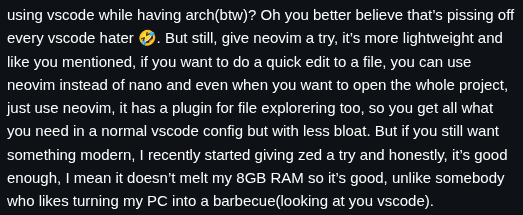
a lot of people fixated on one thing:
“vscode is bloated”
“it eats ram”
“dont use vscode on arch linux”
“switch to neovim or zed”
if you missed it, here’s the setup:
👉 my dev setup april 2026
here’s the problem with that take:
my vscode isn’t slow.
vscode isn’t bloated. your setup is.
i use vscode as my primary editor.
i have:
- a theme (i don't even need it btw)
- the official golang extension
that’s it.
it starts fast.
it doesn’t lag.
it doesn’t randomly break.
so when people say vscode is bloated, what they really mean is:
their vscode is bloated.
because they turned it into something else.
you installed your way into a problem
this is the pattern i keep seeing:
you start with a clean editor.
then you install:
- 5 extensions for git
- 3 for formatting
- 4 for ui tweaks
- 6 productivity boosters(kindof)
- 2 ai assistants
now your editor:
- starts slow
- consumes unnecessary memory
- has conflicting behaviors
and somehow vscode gets blamed.
you’re using it passively
this part matters more than performance.
a lot of developers use vscode like a gui tool:
- clicking through files
- using the mouse for everything
- ignoring the command palette
- avoiding shortcuts
that’s where time is lost.
not in ram usage.
in micro-friction repeated hundreds of times a day.
i even tried the faster editors
after all the comments, i installed neovim and zed.
configured them.
used them for a bit.
they’re fast.
but here’s the part people don’t like admitting:
they weren’t faster than my workflow.
because my bottleneck wasn’t the editor.
the real difference
the biggest improvement came from this:
- keeping my editor minimal
- understanding every tool i use
- relying more on the terminal
- avoiding unnecessary abstraction
for quick edits, i don’t even open vscode.
i just used nano, but ill be using neovim since i already installed it.
nvim file.ts
no startup time. no context switching. edit and move on.
the point
vscode can be bloated.
but it doesn’t start that way.
you make it bloated:
- by installing everything
- by depending on extensions
- by using it passively
if your editor feels slow, don’t switch tools immediately.
fix how you use it first.
because a messy workflow in a fast editor is still a messy workflow.
if you’re into this kind of stuff, subscribe to my newsletter: 👉 click here to subscribe
> stay in the loop
get notified when i write something new. no spam, just code.